Well, you might already know that SharePoint 2013 beta has been released for quite some time. And, to kick start knowledge on this SharePoint 2013, below are few links for you to start:
Download SharePoint 2013 beta software: http://technet.microsoft.com/en-us/evalcenter/hh973397.aspx
Download SharePoint 2013 VM: http://gauravmahajan.net/2012/07/22/sharepoint-2013-virtual-machine/
If you like to setup the VM by yourself: http://nikspatel.wordpress.com/2012/08/02/creating-the-sharepoint-2013-preview-virtual-machine-on-windows-2008-r2-sp1-step-by-step-installation-guide/
Video Demo: http://technet.microsoft.com/en-US/sharepoint/fp123606
To download all presentations: http://www.microsoft.com/downloads/details.aspx?FamilyID=37a2688e-822c-4e08-8a31-73ac507ac16d
SharePoint 2013 on MSDN: http://msdn.microsoft.com/en-us/library/jj162979(v=office.15).aspx
Saturday, September 29, 2012
Thursday, March 25, 2010
Stsadm -o migrateuser Generates Error "Object reference not set to an instance of an object"
I have been involved in some migration tasks for SharePoint, that includes changing of the domain name. SharePoint has quite easy ways of doing migration, as long as you don't meet some strange error messages (hey, I think this applies to any migration!). I will discuss about the data migration in more detailed, hope by next post (however, if you need some information for data migration in SharePoint, please feel free to drop comment).
So, once you meet strange error message, the data migration is not that easy anymore. One error message that keeps me busy doing research is running stsadm -o migrateuser -oldlogin [oldloginname] -newlogin [newloginname] -ignoresidhistory, that return error "Object reference not to set to an instance of object". I just found out recently that it's actually caused by one SSP with status "Unprovisioning". What I need to do is just to delete this SSP, and, voila, the stsadm migrate user command runs succesfully. =
However, it's not a smooth journey to delete this "Unprovisioning" SSP either. The command that save me is stsadm -o deletessp -title [sspname] -force. The first time I executed this, the command hang for very long time. I try to restart the server, and first thing after restart is to execute this command, and it succeeds.
So, once you meet strange error message, the data migration is not that easy anymore. One error message that keeps me busy doing research is running stsadm -o migrateuser -oldlogin [oldloginname] -newlogin [newloginname] -ignoresidhistory, that return error "Object reference not to set to an instance of object". I just found out recently that it's actually caused by one SSP with status "Unprovisioning". What I need to do is just to delete this SSP, and, voila, the stsadm migrate user command runs succesfully. =
However, it's not a smooth journey to delete this "Unprovisioning" SSP either. The command that save me is stsadm -o deletessp -title [sspname] -force. The first time I executed this, the command hang for very long time. I try to restart the server, and first thing after restart is to execute this command, and it succeeds.
Tuesday, March 09, 2010
SharePoint doesn't work well with IPv6
I have just setup a new server farm for SharePoint. After finish installation for all server farm, I start configuring the Shared Service Provider, include activating SharePoint Search. Once the Search turned on, the whole SharePoint site is inaccessible from the server that hosts the Central Administration, all other Web Front End is ok. The page just displayed 503 - Service unavailable. IIS showed that Application Pool has been stopped, so I start it again, but everytime there is a request to the site, the Application Pool stop again.
After checking through the forum and all blogs, it turns out the evil here is the IPv6 is enabled. After turn IPv6 off, all the site work properly again. Damn.. wasted almost 1 hour close to midnight..
After checking through the forum and all blogs, it turns out the evil here is the IPv6 is enabled. After turn IPv6 off, all the site work properly again. Damn.. wasted almost 1 hour close to midnight..
Wednesday, January 13, 2010
SharePoint: How to Move Default Virtual Directory/Site Path Location (Site and Central Administration)
I have encountered requirement to move all the virtual directories to non-system drive. By just removing the default location from C:\inetpub\wwwroot\wss\virtualdirectories\xx to another drive and set the path in IIS will not solve the problem, somehow SharePoint keeps their own path to the original location, and displays some critical error instead.
So the solution is to update the WebApplication to point to the new Virtual Directory location. Luckily, I found this blog that teaches how exactly to do this. So I just create a simple console application that can be executed (using Farm Administrator) from command prompt, e.g. ChangeDefaultDirectory.exe "http://site:80" "Default" "D:\inetpub\WSS\VirtualDirectories\80". And after IISReset, woolahh.. my site are back in action again. This can be used for Central Administration and SSP too. Just be careful with SharePoint Shared Service Provider, you need to use "http://site:xxxx/ssp/admin". For one that needs this simple console, please comment this post with your email, and I will send it to you.
The other things to take note is the default directory of the new Web Application created in SharePoint Central Admin. It might be easily overlooked when you create new Web Application. This blog provides what exactly you need. For IIS7, I found that you only need to change the HKEY_LOCAL_MACHINE\SOFTWARE\Microsoft\InetStp key and modify the PathWWWRoot Value data to D:\Inetpub\vroots. Don't forget to backup your registry before any modification.
So the solution is to update the WebApplication to point to the new Virtual Directory location. Luckily, I found this blog that teaches how exactly to do this. So I just create a simple console application that can be executed (using Farm Administrator) from command prompt, e.g. ChangeDefaultDirectory.exe "http://site:80" "Default" "D:\inetpub\WSS\VirtualDirectories\80". And after IISReset, woolahh.. my site are back in action again. This can be used for Central Administration and SSP too. Just be careful with SharePoint Shared Service Provider, you need to use "http://site:xxxx/ssp/admin". For one that needs this simple console, please comment this post with your email, and I will send it to you.
The other things to take note is the default directory of the new Web Application created in SharePoint Central Admin. It might be easily overlooked when you create new Web Application. This blog provides what exactly you need. For IIS7, I found that you only need to change the HKEY_LOCAL_MACHINE\SOFTWARE\Microsoft\InetStp key and modify the PathWWWRoot Value data to D:\Inetpub\vroots. Don't forget to backup your registry before any modification.
Friday, July 11, 2008
SharePoint 2007: Shared Services "Provision in Progress"
I have one development environment that I use to test webpart or any customizations before deploy to the production server. However, I always failed to setup Shared Services for this particular server, which causes all the search, my site, profile, etc are not working. When the Shared Services are in provisioning stage, it's stopped with timeout error, and in the SharedServices list itself, it's written "Provision in Progress".
At last, we manage to find the cause of the problem, it's caused by SharePoint Services Timer in Windows Services, which is stopped before, because it consumes a lot of resources when some heavy testings are needed. When the Windows SharePoint Services Timer has been started, the Shared Services can be created smoothly.
At last, we manage to find the cause of the problem, it's caused by SharePoint Services Timer in Windows Services, which is stopped before, because it consumes a lot of resources when some heavy testings are needed. When the Windows SharePoint Services Timer has been started, the Shared Services can be created smoothly.
Wednesday, June 25, 2008
Gmail and IE7: Operation Aborted
Well, I believe many of you have experienced this annoying issue. You try to load Gmail in IE7 and IE7 will popup "Operation Aborted". I usually try about 4-5 times, and at the end the Gmail can be loaded. I am not really sure what's wrong with this, and I hope it's not done purposely by either Microsoft or Google. Some said that this is Google way of responding to Microsoft and Yahoo saga, and others argue that this is Microsoft's fault that its application doesn't meet quality standard.
Well, here is Google advice at this page: http://mail.google.com/support/bin/static.py?page=known_issues.cs&knownissue=gmail_issue_ie7operationaborted&topic=12778#
Some Internet Explorer 7 users are reporting the error message "Internet Explorer cannot open the Internet site http://mail.gmail.com/mail/. Operation aborted." If you're experiencing this problem, please use Mozilla Firefox or the older version of Gmail.
And so far, no more useful explanation rather than switch to Firefox and "leave da microsoft's crap for your live". And, if you read on the other solutions there, Google can only advice remove whatever toolbars or addins in IE7 that cause the error. I am not really sure if they're good advices. So, are we allowed to use Google Toolbar only in order to use Gmail smoothly? Come on Google, you can give better explanation, or just fix the issue (for god sake). You're big enough to come out with the complex algorithm for search and unable to solve this small little issue for months? I use a lot of internet/intranet application on IE7, and no single issue happens with the same scale of this error.
Well, here is Google advice at this page: http://mail.google.com/support/bin/static.py?page=known_issues.cs&knownissue=gmail_issue_ie7operationaborted&topic=12778#
Some Internet Explorer 7 users are reporting the error message "Internet Explorer cannot open the Internet site http://mail.gmail.com/mail/. Operation aborted." If you're experiencing this problem, please use Mozilla Firefox or the older version of Gmail.
And so far, no more useful explanation rather than switch to Firefox and "leave da microsoft's crap for your live". And, if you read on the other solutions there, Google can only advice remove whatever toolbars or addins in IE7 that cause the error. I am not really sure if they're good advices. So, are we allowed to use Google Toolbar only in order to use Gmail smoothly? Come on Google, you can give better explanation, or just fix the issue (for god sake). You're big enough to come out with the complex algorithm for search and unable to solve this small little issue for months? I use a lot of internet/intranet application on IE7, and no single issue happens with the same scale of this error.
Monday, June 23, 2008
SharePoint 2007: Default.aspx displayed "HTTP 500 Internal Error"
I have experienced wierd behaviour in SharePoint, which if I type http://server-name/sitename/, it will show "HTTP 500 Internal Error", but when I type http://server-name/sitename/default.aspx, it shows the page correctly. The action I have done to the site is to edit the permission for this site (break the inheritance). I fixed the problem by inheriting the permission back from the parent site, and then edit the permission again. If you face same problem, the symptom I have went through is:
1. You try to edit permission in Advanced Permission, but SharePoint throws some error message, so you decide to go to "_layouts/role.aspx", and break the relationship from there.
2. It seems that everything is fine, until you go to the site without typing "default.aspx" (http://server/site/subsite), it will show HTTP 500 Internal Server Error, but if you include "default.aspx" (http://server/site/subsite/default.aspx) in the URL, it is fine.
3. You cannot export/import the site using stsadm.
4. You cannot see the subsite in the SharePoint Designer parent site (however you can open the site in SharePoint Designer by directly typing the full URL), backup/restore site through SharePoint designer will fail too.
5. You cannot create new Document Library, which SharePoint prompt the list name exists, although you're sure that the document library name does not exist.
6. Solution: Go back to Advanced Permission, Inherit the permission back, and try to edit permission again. Now it shouldn't throw any error.anymore.
1. You try to edit permission in Advanced Permission, but SharePoint throws some error message, so you decide to go to "_layouts/role.aspx", and break the relationship from there.
2. It seems that everything is fine, until you go to the site without typing "default.aspx" (http://server/site/subsite), it will show HTTP 500 Internal Server Error, but if you include "default.aspx" (http://server/site/subsite/default.aspx) in the URL, it is fine.
3. You cannot export/import the site using stsadm.
4. You cannot see the subsite in the SharePoint Designer parent site (however you can open the site in SharePoint Designer by directly typing the full URL), backup/restore site through SharePoint designer will fail too.
5. You cannot create new Document Library, which SharePoint prompt the list name exists, although you're sure that the document library name does not exist.
6. Solution: Go back to Advanced Permission, Inherit the permission back, and try to edit permission again. Now it shouldn't throw any error.anymore.
Tuesday, June 03, 2008
Feature '75a0fea7-c54f-46b9-86b1-2e103a8fedba' is not installed in this farm, and can not be added to this scope
Well, if you come to this page from Google, I believe you are working on demo environment of your SharePoint and try to install Application Templates from Microsoft, and you're kind of puzzled and stress, why the Application Templates cannot be installed, as you have done it smoothly in your own VPC.
Well, one of the possible reason is ApplicationTemplateCore is not installed yet on your server farm. It's one of the initial step before you use any Application Templates. Having played and installed so many application templates, people might miss the initial step in the other SharePoint environment. If this is not the case, there's other suggestion that might work is to append "-force" when you deploy the solution.
Well, one of the possible reason is ApplicationTemplateCore is not installed yet on your server farm. It's one of the initial step before you use any Application Templates. Having played and installed so many application templates, people might miss the initial step in the other SharePoint environment. If this is not the case, there's other suggestion that might work is to append "-force" when you deploy the solution.
Sunday, June 01, 2008
SharePoint Designer: Show Line Break for Multi Text (Plain Text)
If you have Multiline type column and set it with "Plain Text", you might have difficulty to show it using Data View (that is added using SharePoint Designer) for the content that has a line break. It will show as a single line. If you view the HTML Source of the page, the line-break character is actually printed there. It's just that HTML will not interpret such white-space character as line break.
There're 2 ways to overcome this issue:
1. Wrap your <xsl:value-of select="@Column_Name" escaping="yes"></xsl:value-of>using <pre>. However, you will lose the text-wrap functionality, since most browser will render <pre> as it is, no line break means no line break. This maybe a no-go to this solution.
2. Using xslt functionality to change all line break to.For example your original text is:
<xsl:value-of select="@Column_Name" escaping="yes"></xsl:value-of>
Replace it to:
<xsl:call-template name="breakitemdesc"></xsl:call-template>
Add below to the beginning of the other <xslt:template> or after </xslt:template> of the section:
<xsl:template name="breakitemdesc">
<xsl:param name="text" select="@item_x0020_Description"/>
<xsl:choose>
<xsl:when test="contains($text, ' ')">
<xsl:value-of select="substring-before($text, ' ')"/>
<br/>
<xsl:call-template name="breakitemdesc">
<xsl:with-param name="text" select="substring-after($text,' ')"/>
</xsl:call-template>
</xsl:when>
<xsl:otherwise>
<xsl:value-of select="$text"/>
</xsl:otherwise>
</xsl:choose>
</xsl:template>
There're 2 ways to overcome this issue:
1. Wrap your <xsl:value-of select="@Column_Name" escaping="yes"></xsl:value-of>using <pre>. However, you will lose the text-wrap functionality, since most browser will render <pre> as it is, no line break means no line break. This maybe a no-go to this solution.
2. Using xslt functionality to change all line break to.For example your original text is:
<xsl:value-of select="@Column_Name" escaping="yes"></xsl:value-of>
Replace it to:
<xsl:call-template name="breakitemdesc"></xsl:call-template>
Add below to the beginning of the other <xslt:template> or after </xslt:template> of the section:
<xsl:template name="breakitemdesc">
<xsl:param name="text" select="@item_x0020_Description"/>
<xsl:choose>
<xsl:when test="contains($text, ' ')">
<xsl:value-of select="substring-before($text, ' ')"/>
<br/>
<xsl:call-template name="breakitemdesc">
<xsl:with-param name="text" select="substring-after($text,' ')"/>
</xsl:call-template>
</xsl:when>
<xsl:otherwise>
<xsl:value-of select="$text"/>
</xsl:otherwise>
</xsl:choose>
</xsl:template>
Access Denied when Accessing User Profiles and Properties
If you try to access User Profiles and Properties using account that is not part of Administrators group or account that is used to setup SharePoint, you might have problem accessing "User Profiles and Properties" (Access Denied) although you have been added to Farm's Administrator or Shared Services' Site Collection Administrator.
What you need to do:
Click on "Personalization Services Permission" in the Shared Services page, and then grant the permission from there. It seems that this permission is totally separated from other permission setting in SharePoint.
What you need to do:
Click on "Personalization Services Permission" in the Shared Services page, and then grant the permission from there. It seems that this permission is totally separated from other permission setting in SharePoint.
Friday, November 23, 2007
How to Setup Loopback Adapter
Recently, I just got a new notebook, so need to develop something using VPC, but somehow a bit troublesome to configure the network, so decided to use Loopback Adapter instead, so that network can be created easily between the guest and host OS. And just found out that there is extremely easy way to setup Loopback Adapter:
1. Open Device Manager
2. At the top/root, right click, and select Add Legacy Hardware
3. Select Network Adapter, then look for Loopback Adapter (Microsoft).
1. Open Device Manager
2. At the top/root, right click, and select Add Legacy Hardware
3. Select Network Adapter, then look for Loopback Adapter (Microsoft).
Monday, February 12, 2007
Import Mass Data to CRM 3.0: Unable to connect to the remote server
If you have mass/bulk data to be imported which is a custom entity in Microsoft CRM 3.0, there is no other better way, rather than built your own application. By default, CRM 3.0 only provide Bulk Import for Account, Contact and other several system entities (if any). Good luck if you have a lot of custom entities that is not possible to use built-in Bulk Import.
And I am not lucky that my project has quite a lot variety of data to be imported to CRM which is a custom entity. So, I have to built my own application to mass import the data. The application I have built have several basic function, like mapping between excel column and CRM attribute, lookup entity through different attribute, some validation, save/load settings, etc. If I got time, I hope I can tell more about this application in next post. After all seems ok, time to run the real data migration comes. And another unlucky thing happens that after importing about 1000+ records, CRM seems rejecting connection. The specific error is: "The underlying connection was closed: Unable to connect to the remote server". So, no matter what, I have to find a way to solve this problem. It's impossible for me to import every 1000 records for 1.5 million records. First, I try to set some thread sleeping time, or delaying inserting record for several second after several records, no luck. Second, I try to reset the connection by reinitializing the CRM Service, no luck. At last, I ask my uncle Google, and find really good and relevant Knowledge Base, the almighty "913515". If you are not Microsoft Partner, you won't be able to access this, but I think, if you develop Microsoft CRM, you are a Microsoft Partner. But, the point is to set the registry for MaxUserPort and set TcpTimedWaitDelay in HKEY_LOCAL_MACHINE\System\CurrentControlSet\Services\Tcpip\Parameters (they are new registry key value). The maximum value for MaxUserPort is 65,534 (recommended 30,000) and TcpTimedWaitDelay is 260. If you face the same problem and unable to solve it, just contact me. :)
And I am not lucky that my project has quite a lot variety of data to be imported to CRM which is a custom entity. So, I have to built my own application to mass import the data. The application I have built have several basic function, like mapping between excel column and CRM attribute, lookup entity through different attribute, some validation, save/load settings, etc. If I got time, I hope I can tell more about this application in next post. After all seems ok, time to run the real data migration comes. And another unlucky thing happens that after importing about 1000+ records, CRM seems rejecting connection. The specific error is: "The underlying connection was closed: Unable to connect to the remote server". So, no matter what, I have to find a way to solve this problem. It's impossible for me to import every 1000 records for 1.5 million records. First, I try to set some thread sleeping time, or delaying inserting record for several second after several records, no luck. Second, I try to reset the connection by reinitializing the CRM Service, no luck. At last, I ask my uncle Google, and find really good and relevant Knowledge Base, the almighty "913515". If you are not Microsoft Partner, you won't be able to access this, but I think, if you develop Microsoft CRM, you are a Microsoft Partner. But, the point is to set the registry for MaxUserPort and set TcpTimedWaitDelay in HKEY_LOCAL_MACHINE\System\CurrentControlSet\Services\Tcpip\Parameters (they are new registry key value). The maximum value for MaxUserPort is 65,534 (recommended 30,000) and TcpTimedWaitDelay is 260. If you face the same problem and unable to solve it, just contact me. :)


Wednesday, February 07, 2007
MS CRM 3.0: Callout's Configuration
As you know that you won't be able to use configuration settings from web.config, since Callout is executed inside CRM 3.0. I am not sure how the execution of Callout, but I suspect it's still under w3wp process, but it's already handled by CRM 3.0 execution and we are not able to use common function in ASP.NET. It's a common requirement that we need to put some configuration like connection string in some xml file, and it's common practice that this configuration is not hardcoded. So, how do you store and access this configuration. Here I share what I have done for my existing solution:
Create one xml file, for example custom.config, and copy this file to the same directory as your callout library:
<configuration>
<connectionstring>your connection string</connectionstring>
</configuration>
You can access the value of Connection String by writing this code in your callout:
XmlDocument doc = new XmlDocument();
string path = System.Reflection.Assembly.GetCallingAssembly().Location + + @"/custom.config";
doc.Load(path);
// set XPath to point to ConnectionString Node
XmlNode node = doc.SelectSingleNode("//Configuration/ ConnectionString");
string connString = node.InnerText;
If you have more than one configuration, you can add new node inside <configuration> and set the XPath in the code accordingly. Happy configuring!
Create one xml file, for example custom.config, and copy this file to the same directory as your callout library:
<configuration>
<connectionstring>your connection string</connectionstring>
</configuration>
You can access the value of Connection String by writing this code in your callout:
XmlDocument doc = new XmlDocument();
string path = System.Reflection.Assembly.GetCallingAssembly().Location + + @"/custom.config";
doc.Load(path);
// set XPath to point to ConnectionString Node
XmlNode node = doc.SelectSingleNode("//Configuration/ ConnectionString");
string connString = node.InnerText;
If you have more than one configuration, you can add new node inside <configuration> and set the XPath in the code accordingly. Happy configuring!
Saturday, October 28, 2006
Refactoring: Replace Method with Method Object
Well, reading Refactoring book from Martin Fowler, I feel some case of the refactoring I have used before without realizing it. The most interesting I have found so far is Replace Method with Method Object. The idea is if your method is too long, you should find a way to shorten it to make it more readable and self-explained. Well, self-explained can be done using comment in the code. But sometimes comment can be over killed too. Some expert suggest that too much comment means your code is not refactored well-enough. So, in the book, it suggest you to use Extract Method.
I hope below sample can explain what Extract Method, although it's too simple:
void LongFunction(...)
{
// very long function here
foreach(int item in items)
if (item % 2 == 0)
isEven = true;
// another very long function
}
Applying Extract Method, it will be:
void LongFunction(...)
{
// very long function here
foreach(int item in items)
isEven = IsNumberEven(item)
// another very long function
}
bool IsNumberEvem(int item)
{
if (item % 2 == 0)
return true;
else
return false;
}
Ok, most of the cases Extract Method can be used, as Fowler said, 99% cases. But some extreme cases, that you use too much local variable will be very difficult to apply Extract Method, another ways to do are Introduce Parameter Object, Preserve Whole Object, and Replace Method with Method Object.
Well, what I have experienced before is I have a function that is to do Invoice Calculation. This Invoice Calculation include bunch of variable, local object, etc, and quite long of code and logic. This calculation is used in so many places, like Creating Invoice, Check GIRO, Apply GIRO, etc. So, with Replace Method with Method Object, I create totally new class to do Invoice Calculation. All temporary variable and local object are created as class fields/properties. After applying all the logic into the new method inside the new class, I start to refactor using Extract Method. After series of retesting, I found the new code is far easier to read and maintain. The InvoiceCalculation object can be reused easily, without using too many local variable/paremeter. And, another aspect, I can focus on tweaking the performance easier.
The interesting point, I did this before reading the refactoring technique. After reading, I can apply more understandable word to explain what I am doing. Good book, try yourself.
I hope below sample can explain what Extract Method, although it's too simple:
void LongFunction(...)
{
// very long function here
foreach(int item in items)
if (item % 2 == 0)
isEven = true;
// another very long function
}
Applying Extract Method, it will be:
void LongFunction(...)
{
// very long function here
foreach(int item in items)
isEven = IsNumberEven(item)
// another very long function
}
bool IsNumberEvem(int item)
{
if (item % 2 == 0)
return true;
else
return false;
}
Ok, most of the cases Extract Method can be used, as Fowler said, 99% cases. But some extreme cases, that you use too much local variable will be very difficult to apply Extract Method, another ways to do are Introduce Parameter Object, Preserve Whole Object, and Replace Method with Method Object.
Well, what I have experienced before is I have a function that is to do Invoice Calculation. This Invoice Calculation include bunch of variable, local object, etc, and quite long of code and logic. This calculation is used in so many places, like Creating Invoice, Check GIRO, Apply GIRO, etc. So, with Replace Method with Method Object, I create totally new class to do Invoice Calculation. All temporary variable and local object are created as class fields/properties. After applying all the logic into the new method inside the new class, I start to refactor using Extract Method. After series of retesting, I found the new code is far easier to read and maintain. The InvoiceCalculation object can be reused easily, without using too many local variable/paremeter. And, another aspect, I can focus on tweaking the performance easier.
The interesting point, I did this before reading the refactoring technique. After reading, I can apply more understandable word to explain what I am doing. Good book, try yourself.
Thursday, August 17, 2006
Javascript: Debugger
Although I already quite spent times at coding Javascript, I just knew this useful feature in Javascript, that we can put debugger keyword at new line of the code (without any semi colon) that will function like breakpoint. If your browser has already set to enable debugging (Tools > Internet Options > Advanced > Uncheck Disabled Script Debugging, then when the browser execute that line, it will prompt you want to debug the script using any debugging tools (VS2003/2005, etc).
Sunday, July 23, 2006
MS CRM 3.0: How to display Active only at Associated View.
For you do customization on Ms CRM, by default, Ms CRM 3.0 will display both active and inactive record in associated view (View that is displayed child entities in the detail of master entity) for Custom Entities. This is different from default associated view of Contact that is displayed in Account detail, which just displays active record. To achieve same view as Contact, you must edit the exported customization XML manually, since there’s no UI in Ms CRM 3.0 to edit filtering of customized view. And be warned, that this is unsupported way.
Try to export Contact entity from Customization, and find in any text editor “Associated View”, then find
<filter type="and">
<condition operator="eq" value="0" column="statecode">
</filter>
With this condition, you can apply to every Custom Entity to display only Active Record in associated view, by export, edit, import it back and don’t forget to publish the entity. By this mean, you can also put additional condition as needed. If you are not sure what is the format of the condition string, try to do it in the advanced find and see what the string looks like.
Tuesday, March 07, 2006
Sharepoint: Hide Toolbar for Anonymous User
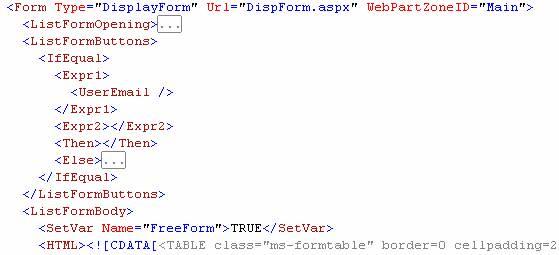
In one of my projects, there's a requirement to change UI for Anonymous User. Sharepoint Services by default, display all the functionality to post new item, edit, etc, like in the List/Item Toolbar. And if user is not authorized, than there's screen to request access. This may be good for internal user, but if your Sharepoint is exposed to Internet for anonymous user. This feature looks weird. So, the workaround for this is to hide this toolbar.
What you need to do is editing the XML Schema/Template for each list. You can see list of existing templates in SPS at folder C:\Program Files\Common Files\Microsoft Shared\web server extensions\60\template\1033\STS\LISTS. Below is example definition for announcement:

What you need to do is editing the XML Schema/Template for each list. You can see list of existing templates in SPS at folder C:\Program Files\Common Files\Microsoft Shared\web server extensions\60\template\1033\STS\LISTS. Below is example definition for announcement:
Javascript: showModal(less)Dialog
In Javascript, if you need to open new window using window.showModalDialog or window.showModelessDialog and then submit form inside the new window, then the form will be submitted to new window, which is usually not the way that we want it to be. There's one workaround that is easy to implement. Just put <base target=_self> inside <head> tag.
What is the difference between window.showModalDialog and window.showModelessDialog? From how Javascript call this two function, when window.showModalDialog is called, the code will stop there and wait until the new window is closed, but for window.showModelessDialog, the code will keep running and don't wait until new window is closed. So if your parent window is supposed to wait until result from new window returns, then use window.showModalDialog. Otherwise, If you don't care about the result or the result is not needed inside the calling method, then use window.showModelessDialog.
What is the difference between window.showModalDialog and window.showModelessDialog? From how Javascript call this two function, when window.showModalDialog is called, the code will stop there and wait until the new window is closed, but for window.showModelessDialog, the code will keep running and don't wait until new window is closed. So if your parent window is supposed to wait until result from new window returns, then use window.showModalDialog. Otherwise, If you don't care about the result or the result is not needed inside the calling method, then use window.showModelessDialog.
Preamble
Here I want to share to fellow developers what I found that is useful if you find the same case. Hope you can find this useful too. Happy to sharing with you. I have another blog that is not specific to programming, but because my life is around IT, so you will find it a lot about IT :). But hope I'm not categorized as nerd or geeky, but if I turn out to be.. then I just can laugh. Check gunady.blogspot.com.
Cheers,
Gunady
Cheers,
Gunady
Subscribe to:
Comments (Atom)