For you do customization on Ms CRM, by default, Ms CRM 3.0 will display both active and inactive record in associated view (View that is displayed child entities in the detail of master entity) for Custom Entities. This is different from default associated view of Contact that is displayed in Account detail, which just displays active record. To achieve same view as Contact, you must edit the exported customization XML manually, since there’s no UI in Ms CRM 3.0 to edit filtering of customized view. And be warned, that this is unsupported way.
Try to export Contact entity from Customization, and find in any text editor “Associated View”, then find
<filter type="and">
<condition operator="eq" value="0" column="statecode">
</filter>
With this condition, you can apply to every Custom Entity to display only Active Record in associated view, by export, edit, import it back and don’t forget to publish the entity. By this mean, you can also put additional condition as needed. If you are not sure what is the format of the condition string, try to do it in the advanced find and see what the string looks like.
Sunday, July 23, 2006
MS CRM 3.0: How to display Active only at Associated View.


Tuesday, March 07, 2006
Sharepoint: Hide Toolbar for Anonymous User
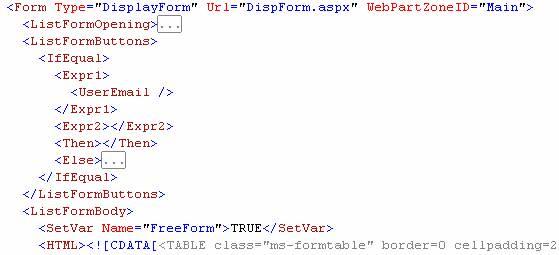
In one of my projects, there's a requirement to change UI for Anonymous User. Sharepoint Services by default, display all the functionality to post new item, edit, etc, like in the List/Item Toolbar. And if user is not authorized, than there's screen to request access. This may be good for internal user, but if your Sharepoint is exposed to Internet for anonymous user. This feature looks weird. So, the workaround for this is to hide this toolbar.
What you need to do is editing the XML Schema/Template for each list. You can see list of existing templates in SPS at folder C:\Program Files\Common Files\Microsoft Shared\web server extensions\60\template\1033\STS\LISTS. Below is example definition for announcement:

What you need to do is editing the XML Schema/Template for each list. You can see list of existing templates in SPS at folder C:\Program Files\Common Files\Microsoft Shared\web server extensions\60\template\1033\STS\LISTS. Below is example definition for announcement:
Javascript: showModal(less)Dialog
In Javascript, if you need to open new window using window.showModalDialog or window.showModelessDialog and then submit form inside the new window, then the form will be submitted to new window, which is usually not the way that we want it to be. There's one workaround that is easy to implement. Just put <base target=_self> inside <head> tag.
What is the difference between window.showModalDialog and window.showModelessDialog? From how Javascript call this two function, when window.showModalDialog is called, the code will stop there and wait until the new window is closed, but for window.showModelessDialog, the code will keep running and don't wait until new window is closed. So if your parent window is supposed to wait until result from new window returns, then use window.showModalDialog. Otherwise, If you don't care about the result or the result is not needed inside the calling method, then use window.showModelessDialog.
What is the difference between window.showModalDialog and window.showModelessDialog? From how Javascript call this two function, when window.showModalDialog is called, the code will stop there and wait until the new window is closed, but for window.showModelessDialog, the code will keep running and don't wait until new window is closed. So if your parent window is supposed to wait until result from new window returns, then use window.showModalDialog. Otherwise, If you don't care about the result or the result is not needed inside the calling method, then use window.showModelessDialog.
Preamble
Here I want to share to fellow developers what I found that is useful if you find the same case. Hope you can find this useful too. Happy to sharing with you. I have another blog that is not specific to programming, but because my life is around IT, so you will find it a lot about IT :). But hope I'm not categorized as nerd or geeky, but if I turn out to be.. then I just can laugh. Check gunady.blogspot.com.
Cheers,
Gunady
Cheers,
Gunady
Subscribe to:
Posts (Atom)